★ ★ ★ ★ ★
“Finally, a crypto workflow that feels like asking an AI instead of operating a Bloomberg terminal.”
Solana trader · community sentiment
SolDexAI brings powerful Solana DEX intelligence into ChatGPT — discover tokens, scan markets, inspect your holdings, and execute trades without leaving the conversation.
Get a comprehensive overview of the platform, its features, and how it empowers you to navigate the Solana DEX ecosystem effectively.
This video provides a detailed introduction to the platform, highlighting its key features and demonstrating how to effectively use the Solana DEX ecosystem.
Get a comprehensive overview of the platform, its features, and how it empowers you to navigate the Solana DEX ecosystem effectively.
Due to the Plugin submission denial by OpenAI, a manual installation is required 🤬
This is their official response:
"Your app includes content or functionality that is not suitable for users under 18, which is not supported at this time."
Because of the token names 🤦♂️
So... here are the installation steps:
Everything you need to interact with the Solana DEX ecosystem, wrapped into a simple AI interface.
Search the Solana DEX by token name, symbol, or wallet-compatible token address.
Surface tokens currently gaining attention across the Solana DEX landscape.
Inspect the tokens currently associated with your Solana DEX portfolio.
Execute supported Solana token purchases directly through the SolDexAI experience.
Platform fee is only 0.5% per trade
Manage exits by selling a chosen percentage of supported Solana token positions.
Platform fee is only 0.5% per trade
Ask for market intelligence in plain language instead of navigating a maze of crypto dashboards.
Crypto moves quickly. SolDexAI turns the tools you need into a conversational workflow so you can discover, inspect and act without constantly switching between apps.
Try the AI workflow →Platform fee is only 0.5% per trade
Ask for what you want instead of learning another crypto UI.
Designed around the speed and ecosystem of Solana DEX markets.
Search, monitor, inspect, buy and sell from one workflow.
Buy SolDexAI token (SDA) to support the growth and development of our platform and ecosystem.
Token address: 2E1diAXbyx5tqrniHvfj5Lb4uCza3sGJuZi1e4sFpump
“Finally, a crypto workflow that feels like asking an AI instead of operating a Bloomberg terminal.”
“The interesting part isn't another dashboard. It's being able to ask for the market context directly.”
“Search, trending tokens and portfolio context in one conversation makes the workflow dramatically cleaner.”
Open SolDexAI in ChatGPT and put the Solana DEX toolkit to work.
Launch SolDexAI ↗Platform fee is only 0.5% per trade
Listed on the Solana Tools Directory (STD) and LaunchNest for increased visibility and credibility within the Solana ecosystem.
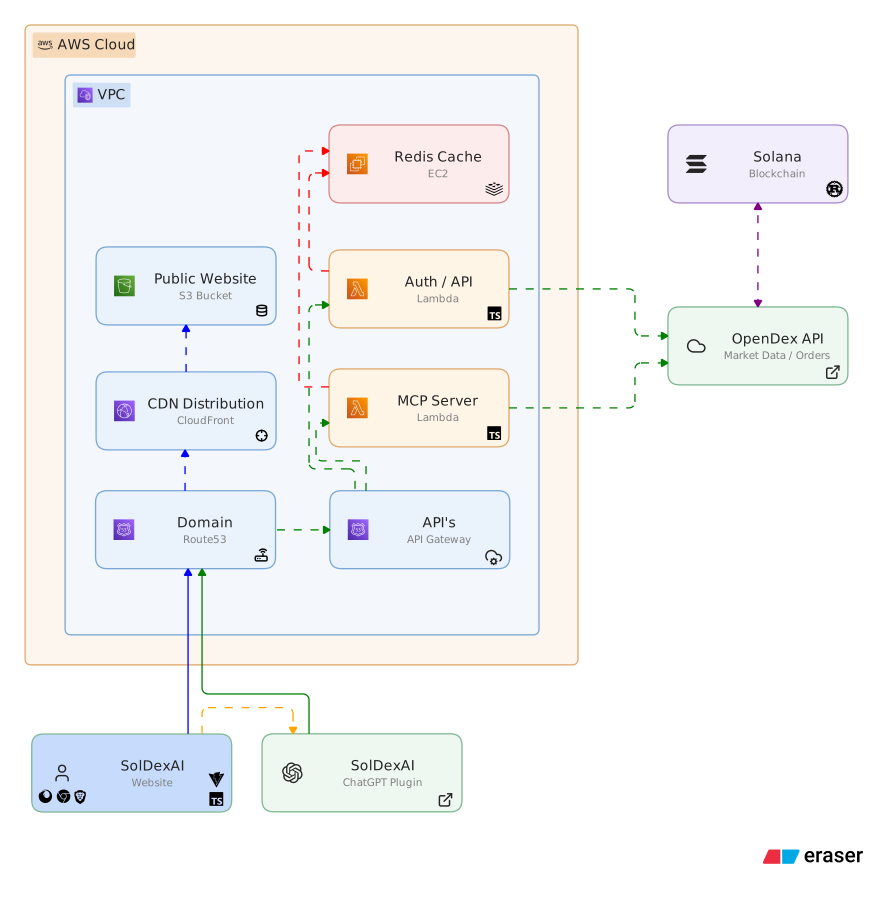
A high-level overview of the core components and integrations that power SolDexAI.